
October 2026
October Feature Drop
Everything new in Orthii since August.
We've been busy. Over the last 60 days Orthii launched publicly, landed on the iPhone, and picked up a long list of improvements suggested by the practices using it every day. Here's what's new.
New features
Orthii Capture for iPhone
Now on the App Store. Scan the QR code on your computer and take records photos in a dedicated app built for one-handed chairside use.
Photo Series Templates. Set up your practice's own photo sets and order so every series comes out the same, whoever takes it.
Foot pedal capture. Pair a Bluetooth page-turner pedal: right pedal captures and accepts, left pedal retakes. Hands stay on the patient.
Recommended gear. The light and foot pedal we use for chairside photos.
Recommended light (opens in a new tab)Recommended foot pedal (opens in a new tab)
As an Amazon Associate, Orthii earns from qualifying purchases.
Approve a computer sign-in from your phone
Tap the matching number. Signing in on a computer? Open the sign-in email on your phone, check which computer is asking, and tap the 2-digit number that computer is showing. The computer signs right in. Your phone stays signed out unless you choose otherwise.
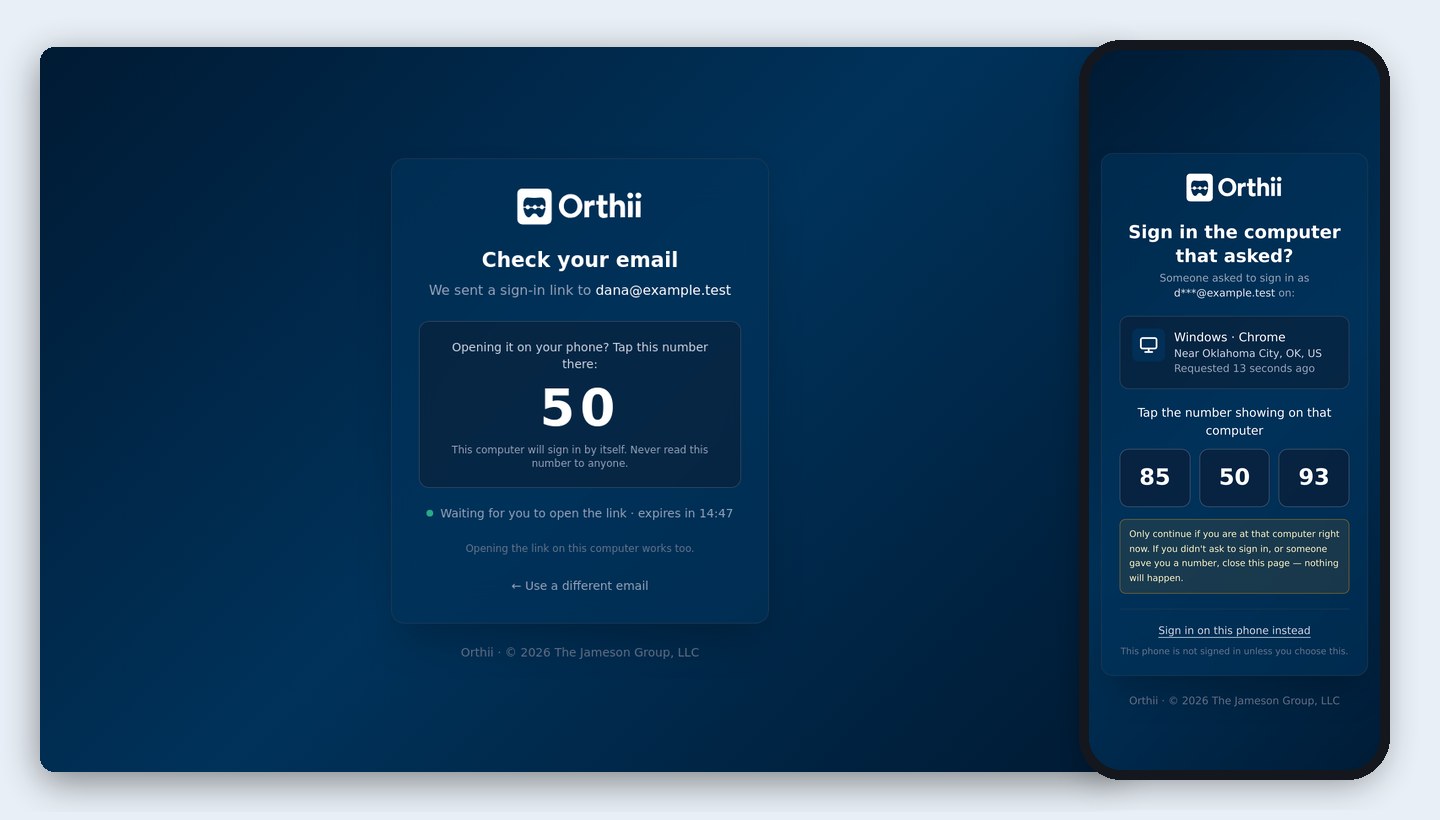
Safe by design. You get a confirmation email every time. Each approval works only once and expires after 2 minutes, and approvals from a different country than the computer are blocked.
Works on shared computers too. Use it on shared workstations when you sign in with email. PIN sign-in works the same as before.
3D models in color, in the bite
Color scans. Open color OBJ and PLY scans, including iTero color, and switch between Color and Stone views.
Bite registration. For scanners that save each arch separately, Orthii lines the arches up using your bite scan. Switch between Scanned bite, Bite registration and Stacked at any time.
Measure and download. Measure distances and angles on the model, and download scan files from the records page.
Your brand on every report
Practice logo on ceph reports, 3×3 photo reports and Present Case (Settings → Branding).
Light Present Case theme that suits your logo.
Treatment letters and estimates. Save treatment time and fee estimates and personalize the letter you give patients.
Holexa analysisValidating
The age-adjusted Holexa analysis is now selectable, with the same easy-to-read deviation chart as every other analysis. We're still validating it against reference reports.
Patient records
Guardian and responsible-party contacts saved with the patient.
Patient merge to clean up duplicates, with a preview first.
Note templates and treatment tracking for wires, aligners and treatment progress.
Help and training
Help Center at orthii.com/support, plus in-app help.
Training Library with course cases you can open right in the ceph workspace (for enrolled courses).
Improvements and fixes
3D models
Models now load facing forward and right side up, whichever scanner exported them.
Upper and lower arches stay in the bite your scanner recorded.
Opening and closing the jaw is much smoother.
When an appointment has more than one upload, the newest scan is shown.
Capture
Easier camera: torch, pinch zoom, clearer portrait and landscape controls, and upload from the phone's library.
Clearer messages if a QR code has expired or the phone loses signal, with an easy way to try again.
Dolphin migration
Bulk migration of patients, visits and images, with progress you can follow. 120,000+ images migrated so far.
Safe re-imports: preview Merge, Skip or Create new before anything changes. Nothing is duplicated or overwritten.
Bulk image unlock for many patients at once, with a quote before you buy.
Sturdier export tool: checks free space first, uploads large archives in parallel and picks up where it left off.
Moving from another practice-management system
Moving from Eaglesoft or another practice-management system? We now bring your photos into Orthii for you. Contact support@orthii.com before you start, and we'll plan the move with you.
Ceph and records
Sassouni+ refinements: updated arcs, report overlays and an 11-category summary.
Search from anywhere: find patients by name or date of birth from the top bar, with patient photos in lists and the schedule.
Photo touch-ups: crop, straighten, adjust brightness and contrast, and move photos into the right positions.
Security and reliability
Stronger permissions, protected capture and import sessions, clearer error messages and more reliable image loading.
Have an idea? Use Support in the app — a lot of this list started there.
October giveaway: LED photo light + foot pedal kit
Want the setup we use for chairside photos? From October 14 to November 14, 2026, your practice earns entries for the things that get the most out of Orthii. Already done some of these? They count.
Migrate from Dolphin5 entries
A completed Dolphin import into your practice.
Add your teamUp to 5 entries
One entry for each team member (beyond the owner) who has signed in, up to 5.
Set up a shared computer2 entries
A registered shared workstation with at least 2 staff PINs.
Try Pro3 entries
Be on a Pro or Pro+ plan or trial during the giveaway. A free trial counts the same as a paid plan.
Enter free by email1 entry
Email giveaway@orthii.com with your practice name. No action in Orthii needed.
- Dates
- October 14 – November 14, 2026. Winner drawn November 17, 2026.
- Official rules
- Read the official rules
No purchase necessary. A purchase or payment does not improve your chances. Open to US practices with an active Orthii account. One prize per practice. Odds depend on the number of entries. Void where prohibited. See the official rules.